
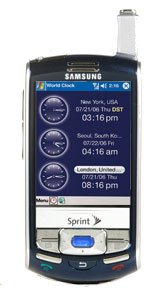
Samsung IP-830w launched by Sprint

Oct 02 2006 - 04:02 PM ET | Samsung, Sprint Nextel

samsung ip-830wSprint has launched the dual-mode Samsung IP-30w. The device is based off the Samsung i730 but sports a GSM radio instead of WiFi to allow for worldwide roaming. Verizon Wireless launched the handset as the Samsung i830, albeit with an older version of Windows Mobile. The handset features a slide style design to reveal a full QWERTY keyboard.

Features of the Samsung IP-830w include:

  • Dual mode CDMA + GSM (dual band)
  • EV-DO highspeed data
  • Bluetooth
  • Speakerphone
  • Windows Mobile 5.0
  • SD I/O slot
  • GoodLink email
  • QVGA display with 262k colors
  • QWERTY keyboard

Sprint is selling the IP-830w for $599 after $150 in instant savings and a 2-year service agreement. It's available now.

Comments from readers


KB8DOA Oct 03 2006

Careful there...

GSM is actually only dual-band
not really quad-band GSM !

Don't fall for the
Dual Band CDMA + Dual Band GSM = Quad Band trick...


Jon Gales Oct 03 2006

Thanks for the tip, the story has been updated!


ken Oct 18 2006

Let's face it, this isn't a phone. It really is a mobile intelligent terminal (MIT) that has great phone/voice capabilities. After being a Treo 600, 650 and 700P user, it took some getting used to (to transition from the treo User Interface to the WM5 UI). But as a true mobile tool for a business professional, it's outstanding! Voice quality is great. Speaker phone is loud and clear, internal Mic and Speaker are clear as well. Easy to hear in noisy environment.
There are tricks to getting the most out of the menu's... worth spending an evening or two to investigate and create quick button menu access to your favorite tools.
Spb NewsReader: don't even bother. This news reader (doesn't come with phone but just HAVE to tell you this) is NOT updated to work with this phone, causes root reformatting after hanging the phone. Other readers work fine.
Screen is quite bright (no pda is that great in the sun, this one is up to par with the rest). Touch Screen very accurate and forgiving.
Active Sync 4.2 comes with it, setup quite easily. Works nicely. I setup other POP/SMTP accounts using the default outlook messaging app on the phone, works great! I was worried when I was giving up my snappermail (palm) for this... but my fears weren't justified. No problems at all.
Battery Life: not sure what Samsung uses to measure battery life... with GPS turned off (don't worry, even off it turns on for 911 calls), Blue Tooth turned off (when not using BT headset which by the way works GREAT! I use the Palm BT Headset/ear bud and everything works wonderfully... including voice recognition/command)... and having screen 1/2 dimmed, I get about 3 hours max talk time before recharge needed. In all fairness, I do a lot of activesync over bluetooth... I may switch to dual USB/Charge cable accessory (if I can find one that works.. tried Dr. Mobile's and it didn't).
Contacts Management AOK. Everything you can do in outlook you can do with this... same goes for calendar, tasks, notes, etc.
Get an SD Storage Card! I bought a 4Gbyte SD card for $149. Worth every penny.
Get SPRITE BACKUP. It works flawlessly! Have it backup to your SD card and tell it to put copy of sprite backup EXE on the card too. When the Spb RSS Reader hung the phone and causes Root Reformat, I recovered fully in under 4 minutes via Sprite Backup. Thank Goodness!
SafeStore is a FLASH RAM memory area on the phone. Good if you ran battery down to the ground and refused to shut off and lost volatile memory. But don't rely on SafeStore area... use Sprite Backup to backup to SD card. Far more flexible. And it Works!
Word, Excel, PowerPoint (pocket edition) work quite well. You can also do a SAVE AS to take a pocket edition version and save as a DOC, XLS, PPT file to email to someone's workstation address (or beam or BT it over). Again, no surprised. Works great. Table formatting stays with it. I haven't tried embedded images in word and excel but everything else works.
I use MindJet MindManager Pro vers 6 on desktop. Just installed MindJet Pocket version... oh my... works like a charm! Amazing horsepower in the hand.
It is heavy. Still looking for right case or clip to use. If you need Windows Mobile PPC that does everything you need, this is it. If you're an ex-treo user like me, pls remember: this is an MIT, not just a smart phone. Think of it as a micro-laptop. Keeping that perspective, you can't go wrong. Enjoy!


ken Oct 18 2006

Let's face it, this isn't a phone. It really is a mobile intelligent terminal (MIT) that has great phone/voice capabilities. After being a Treo 600, 650 and 700P user, it took some getting used to (to transition from the treo User Interface to the WM5 UI). But as a true mobile tool for a business professional, it's outstanding! Voice quality is great. Speaker phone is loud and clear, internal Mic and Speaker are clear as well. Easy to hear in noisy environment.
There are tricks to getting the most out of the menu's... worth spending an evening or two to investigate and create quick button menu access to your favorite tools.
Spb NewsReader: don't even bother. This news reader (doesn't come with phone but just HAVE to tell you this) is NOT updated to work with this phone, causes root reformatting after hanging the phone. Other readers work fine.
Screen is quite bright (no pda is that great in the sun, this one is up to par with the rest). Touch Screen very accurate and forgiving.
Active Sync 4.2 comes with it, setup quite easily. Works nicely. I setup other POP/SMTP accounts using the default outlook messaging app on the phone, works great! I was worried when I was giving up my snappermail (palm) for this... but my fears weren't justified. No problems at all.
Battery Life: not sure what Samsung uses to measure battery life... with GPS turned off (don't worry, even off it turns on for 911 calls), Blue Tooth turned off (when not using BT headset which by the way works GREAT! I use the Palm BT Headset/ear bud and everything works wonderfully... including voice recognition/command)... and having screen 1/2 dimmed, I get about 3 hours max talk time before recharge needed. In all fairness, I do a lot of activesync over bluetooth... I may switch to dual USB/Charge cable accessory (if I can find one that works.. tried Dr. Mobile's and it didn't).
Contacts Management AOK. Everything you can do in outlook you can do with this... same goes for calendar, tasks, notes, etc.
Get an SD Storage Card! I bought a 4Gbyte SD card for $149. Worth every penny.
Get SPRITE BACKUP. It works flawlessly! Have it backup to your SD card and tell it to put copy of sprite backup EXE on the card too. When the Spb RSS Reader hung the phone and causes Root Reformat, I recovered fully in under 4 minutes via Sprite Backup. Thank Goodness!
SafeStore is a FLASH RAM memory area on the phone. Good if you ran battery down to the ground and refused to shut off and lost volatile memory. But don't rely on SafeStore area... use Sprite Backup to backup to SD card. Far more flexible. And it Works!
Word, Excel, PowerPoint (pocket edition) work quite well. You can also do a SAVE AS to take a pocket edition version and save as a DOC, XLS, PPT file to email to someone's workstation address (or beam or BT it over). Again, no surprised. Works great. Table formatting stays with it. I haven't tried embedded images in word and excel but everything else works.
I use MindJet MindManager Pro vers 6 on desktop. Just installed MindJet Pocket version... oh my... works like a charm! Amazing horsepower in the hand.
It is heavy. Still looking for right case or clip to use. If you need Windows Mobile PPC that does everything you need, this is it. If you're an ex-treo user like me, pls remember: this is an MIT, not just a smart phone. Think of it as a micro-laptop. Keeping that perspective, you can't go wrong. Enjoy!


Post a comment


You may use basic HTML tags for style